Leave your message

-
Leon Zhang sales consultant
-
Phone/WhatsApp/Wechat: +86 13655813266

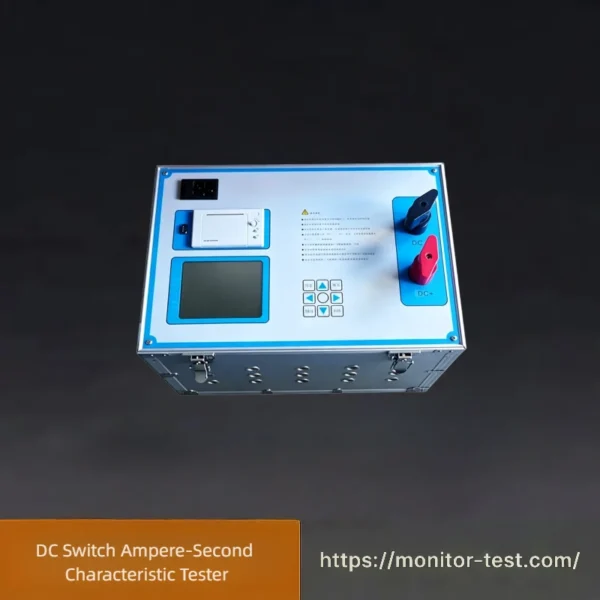
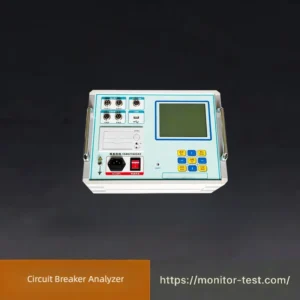
HF-WC-617 DC Switch Ampere-Second Characteristic Tester
DC Switch Ampere-Second Characteristic Tester accurately measures time-current trip curves of DC circuit breakers and fuses. It outputs stable large DC current, precisely records breaking time, draws characteristic curves, verifies selective coordination for substation DC systems with high precision and portable design for on-site maintenance.
Send your requirements, we will quote for you within 12 hours
This instrument is specially developed for testing, overhaul and maintenance work in substations. It is capable of testing overload and short-circuit characteristics of DC circuit breakers, so as to improve the operational reliability of substation DC systems and prevent selective tripping failure (upstream tripping ahead of downstream devices) and consequent large-scale power outages in DC power distribution networks能源电力期….
Functional Features
✅ Adopts switch-mode constant current control technology and advanced power devices; constant current output can be freely set from 1A to 500A.
✅ Applicable for ampere-second characteristic tests on DC circuit breakers with rated current 1A~500A and DC fuses rated 6A~100A.
✅ Supports full-point testing and spot sampling testing modes, featuring fast response, high testing precision, safety and stability.
✅ Equipped with comprehensive protection against overheating, overcurrent and overvoltage; excellent electromagnetic compatibility and strong anti-interference performance.
✅ The dedicated test management software automatically completes ampere-second characteristic tests for DC circuit breakers, analyzes test data, plots circuit breaker protection characteristic curves, and generates & exports test reports.
✅ Applicable for ampere-second characteristic tests on DC circuit breakers with rated current 1A~500A and DC fuses rated 6A~100A.
✅ Supports full-point testing and spot sampling testing modes, featuring fast response, high testing precision, safety and stability.
✅ Equipped with comprehensive protection against overheating, overcurrent and overvoltage; excellent electromagnetic compatibility and strong anti-interference performance.
✅ The dedicated test management software automatically completes ampere-second characteristic tests for DC circuit breakers, analyzes test data, plots circuit breaker protection characteristic curves, and generates & exports test reports.
Technical Specifications
- Operating Power Supply: AC 220V, 50Hz
- Test Current Range: 1A ~ 500A
- Current Ripple Factor: < 2%
- Output Current Stability: ≤ ±1%
- Time Recording Range: 1ms ~ 1000s
- Minimum Time Resolution: 0.1ms
DC Switch Ampere-Second Characteristic Tester Operating Steps
| Serial Number | Step Name | Detailed Operation Content |
|---|---|---|
| 1 | Preparation | Place the tester on a dry flat surface. Check cables and connect AC220V power supply. |
| 2 | Wiring | Connect the test output wires to the DC breaker terminals. Connect the signal wire to the trip contact for timing. |
| 3 | Parameter Setting | Turn on the device. Set breaker rated current, test current and test mode (full-point / sampling test). |
| 4 | Start Test | Start the test. The tester outputs constant current and automatically records the tripping time. |
| 5 | Data & Report | The system automatically generates TCC curves and test reports. Save or export the data. |
| 6 | Shutdown & Storage | Power off the device, remove all wires, and tidy up the equipment. |
Packing List: DC Switch Ampere-Second Characteristic Tester
| Item No. | Description | Quantity | Remarks |
|---|---|---|---|
| 1 | Main Tester Unit | 1 Set | Core host for ampere-second characteristic testing |
| 2 | AC Power Cord (220V) | 1 Pc | For device power supply |
| 3 | High Current Test Output Cables | 2 Pairs | Connect to DC circuit breaker main terminals |
| 4 | Timing Signal Wires | 1 Pair | Connected to breaker trip auxiliary contact |
| 5 | User Operation Manual (English Version) | 1 Copy | Complete operating guidelines & parameter instructions |
| 6 | Calibration Certificate | 1 Copy | Factory calibration report, valid for 1 year |
| 7 | Inspection Acceptance Sheet | 1 Copy | FAT factory test record |
| 8 | Portable Hard Carrying Case | 1 Pc | Shockproof storage & transportation |
| 9 | Spare Fuses | 3 Pcs | Replacement consumables for host protection |
FAQ for DC Switch Ampere-Second Characteristic Tester
Q1: The tester cannot power on after connecting the 220V power supply?
A: Check if the 220V power cord is securely connected and the power supply is normal. Inspect if the internal fuse is blown. Replace the spare fuse if necessary, then restart the device.
Q2: The device displays unstable voltage after startup?
A: Place the tester on a dry, flat surface and keep it away from strong electromagnetic interference. Avoid operating under overvoltage or undervoltage conditions, and reconnect the power supply firmly.
Q3: Why does the test fail after wiring?
A: Ensure two correct connections: 1) High-current test cables are tightly connected to DC breaker main terminals; 2) Signal wires are correctly connected to the trip auxiliary contact. Loose or wrong wiring will cause test failure.
Q4: Is it allowed to wire the breaker with load?
A: No. Disconnect all loads from the breaker before testing. Isolated test objects ensure accurate test results and prevent equipment damage.
Q5: What is the difference between full-point test and sampling test mode?
A: Full-point test collects complete full-range current data and generates full TCC curves, suitable for official factory acceptance. Sampling test adopts intermittent detection with high efficiency, ideal for daily quick spot checks.
Q6: Can I set a test current higher than the breaker rated current?
A: Yes. This tester supports over-current testing. Set 1.1~3 times the breaker rated current per standard requirements to detect overload and tripping characteristics.
Q7: The tester outputs current but no trip time data is recorded?
A: Check if the signal wire is loose, broken or incorrectly connected. Abnormal signal circuits will fail to collect trip timing data during current output.
Q8: Why are the tested tripping time data inaccurate?
A: Inaccurate data is mainly caused by loose wiring, high ambient temperature, aging breakers or mismatched parameter settings. Eliminate external interference and reset parameters for retesting.
Q9: How to save and export test reports and TCC curves?
A: The system automatically generates TCC curves and test reports after testing. Users can save data locally or export files via the reserved interface for filing and analysis.
Q10: Can historical test records be queried?
A: Yes. The device supports multi-group data storage. Historical test records can be viewed, recalled and exported via the device menu.
Q11: How to maintain the tester after long-term use?
A: Power off and disconnect all wires after use. Clean the device surface and cables. Store the tester in a dry, dust-proof and moisture-proof environment. Regularly check cable insulation and fuse conditions.
Q12: What should I do if the test wire is worn or damaged?
A: Stop use immediately to avoid short circuits and test errors. Replace with original matched test cables only; do not use incompatible accessories.
Q13: The device overheats during long-time high-current test?
A: Continuous high-current testing causes heat accumulation. Allow sufficient cooling intervals after each high-current test, and avoid long-term continuous overload operation.
Q14: The touch screen is unresponsive or stuck?
A: Restart the device first. If the fault recurs, move the tester away from high-power equipment to avoid strong electromagnetic interference.
Reviews
There are no reviews yet.